
Fifty engineers sharing one NAI instance is a normal shape for a platform team. NAI 2.8 adds a policy layer that decides who gets to look at what, down to the individual entity and the individual action.
I’ve written before about NAI’s gateway collapsing two auth schemes into one. That piece was about one endpoint for two model sources. This one is the harder version of the same problem: one endpoint, fifty separate owners, each of whom should only ever see their own corner of it.
Every action maps to a permission
Every action in the NAI UI maps to a specific IAM permission. Viewing a page is one. So is creating an endpoint, or deleting a model. When someone signs in, NAI works out which permissions their assigned policies grant and adjusts the UI one action at a time, which is finer than gating whole pages.
The model behind that has five parts. Identity is the user or user group asking for access. Entity is the resource they want to touch, a model, an endpoint, a data source. Permission pairs an entity with an operation, create model on the model entity, delete endpoint on the endpoint entity. Role is a collection of permissions. Authorization policy binds a role to an identity and, this is the part that does the work, optionally restricts that role to a specific set of entities. That restriction is the scope.
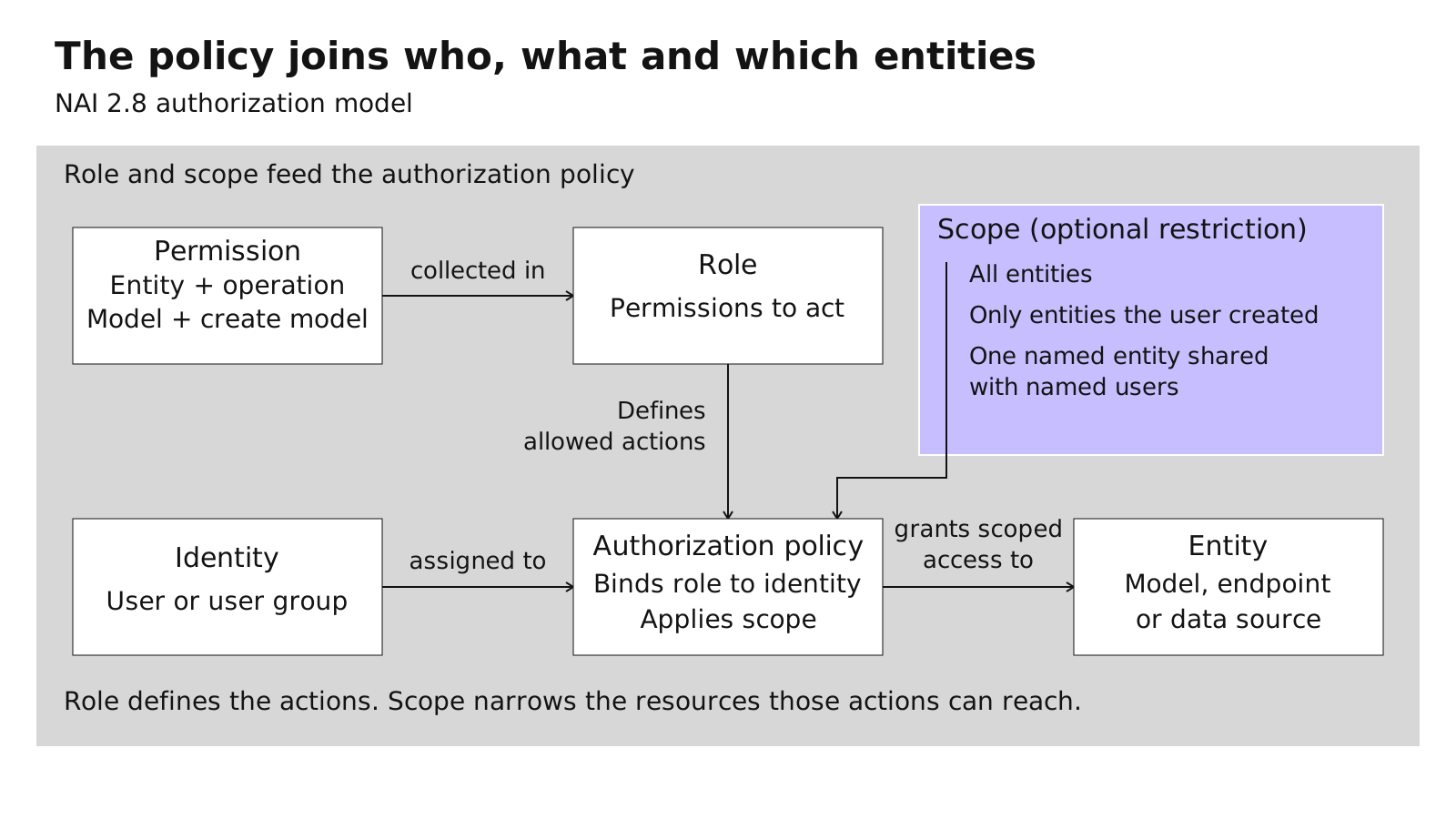
Four pre-defined system roles ship out of the box: ML Admin, ML User, Read Only, and License Manager. If none of those fit, you build a custom role from individual permissions. A data-science reviewer might get nothing but view rights on models and endpoints. A model developer gets create, view, and delete on models and nothing else.
Scope is where the multi-tenancy happens
A role says what someone can do. Scope says to what. Same role, three different outcomes depending on how the policy is written.
A policy can grant a role against every entity of a type on the cluster, every model, full stop. It can restrict a role to only the entities the assigned user created, so each engineer’s dashboard shows their own resources and nothing else. Or it can hand one specific resource to specific named users, without touching the rest.
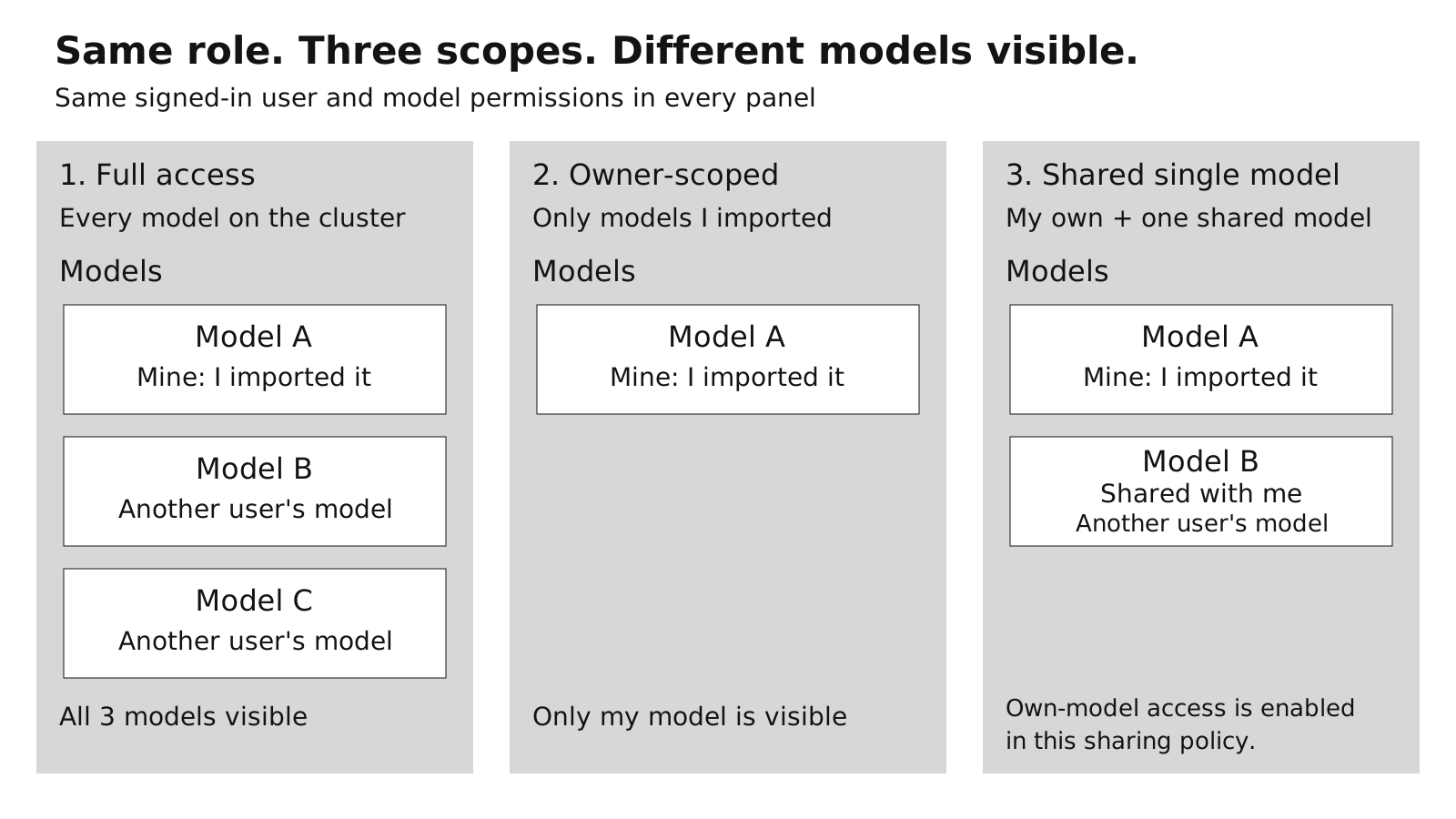
That middle option, owner-scoped access, is what makes fifty engineers sharing an instance workable at all. It applies to models, local endpoints, unified endpoints, API keys, MCP client keys, MCP servers, MCP connectors, data sources, fine-tune jobs, and batch inference jobs. That’s the full list of things NAI tracks by creator. Someone went through every entity type that records who made it and wired ownership into the authorization check, rather than stopping at the Models page.
Sharing one model without sharing the fleet
The other half of 2.8 is model sharing, a narrower case of the same authorization policy. You build a policy scoped to entity type Model, filter it down to one individual model rather than all models, and assign it to the users or groups who should get it.
Once that policy exists, the users you named see that one model on the Models page and can select it when creating an endpoint. They don’t get the rest of the fleet. Until now teams faked this by duplicating endpoints or passing things around in Slack, which meant widening access for everyone to get one person what they needed.
Nothing is granted by default
A user with no assigned role does not land on a limited dashboard. They land on an Access Denied page. Permissions aren’t handed out when you create an account or import a user from Active Directory. Someone has to assign that user to an authorization policy before they can do anything at all.
Deny by default is the right posture for a shared instance, and it also means rolling this out is real setup rather than a switch you flip. Every user needs a role and a policy assigned before they can work.
What the UI does
Owner-scoped access changes the UI in two ways. List pages, Models, Endpoints, API Keys, MCP Servers, show only the entities the signed-in user created. Row actions on entities that belong to someone else are disabled, with a tooltip telling the user they don’t have access and to contact an administrator.
The enforcement lives in the permission check behind each action and each row, which is a real boundary. The hidden nav item and the greyed-out button are what that check looks like from the outside.
Back to the fifty engineers
They can now share one instance without seeing each other’s models, keys, or fine-tuning jobs, provided someone assigns the roles and policies instead of leaving new users on the default of nothing.