
A lot of AWS customers are sitting on Dedicated Hosts they’ve already paid for. Some bought them for licensing reasons, some for compliance, some because a project changed shape after the capacity was reserved. Until recently, none of that capacity helped when they deployed Nutanix Cloud Clusters (NC2) on AWS. NC2 would go out and allocate brand new Dedicated Hosts right next to the ones the customer already owned.
Bring Your Own Host (BYOH) changes that. NC2 can now deploy clusters onto existing, already-paid-for AWS Dedicated Hosts before it provisions any net-new capacity. Phase 2 adds the control piece: you decide exactly which hosts NC2 is allowed to touch.
Why customers own Dedicated Hosts in the first place
Dedicated Hosts give you a physical EC2 server that belongs to your account alone. An instance on a Dedicated Host stays on that physical host, even through a power cycle. That property matters for two groups of people.
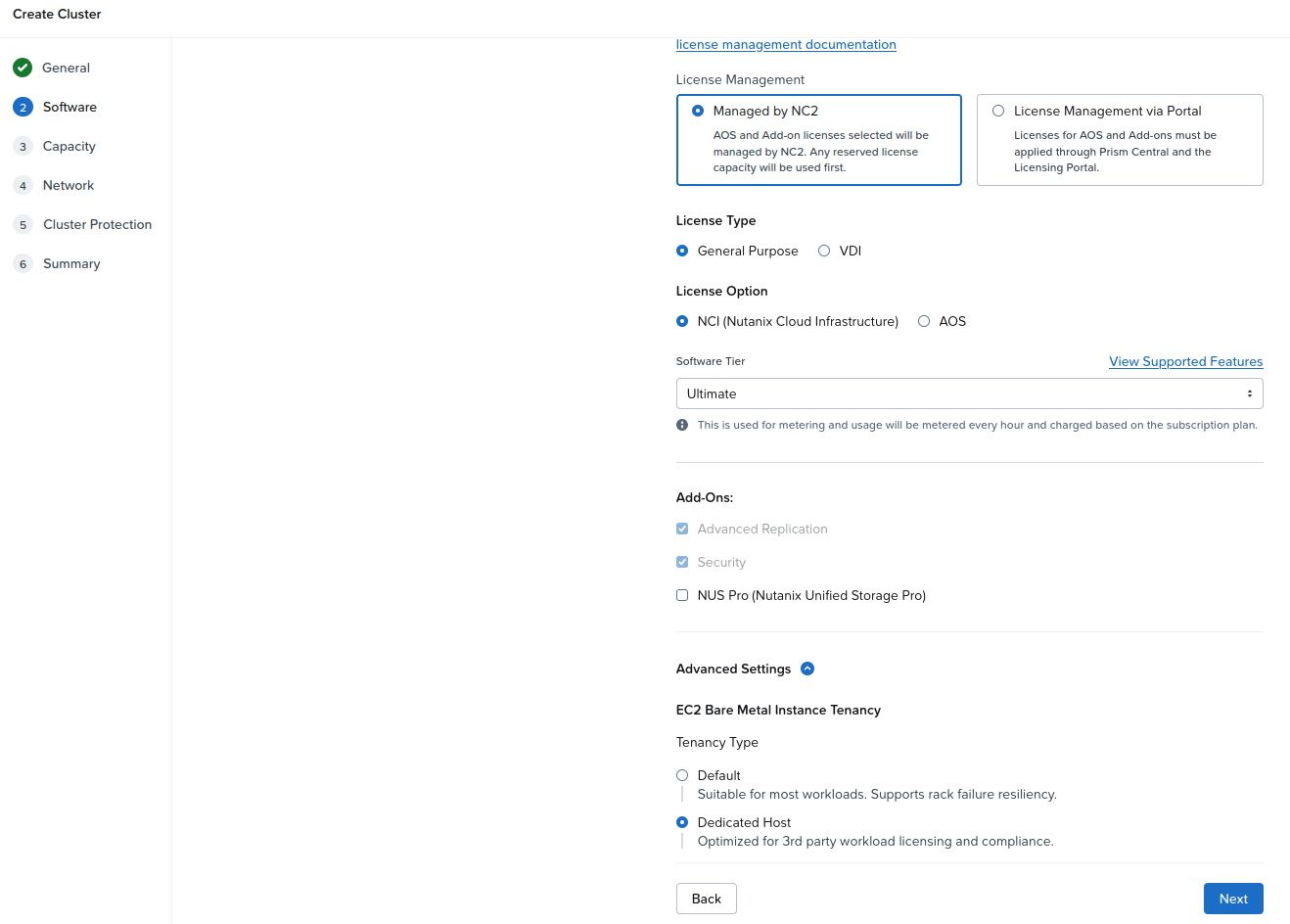
The first is anyone with third-party workload licensing tied to the hardware it runs on. A host that doesn’t move underneath you makes that much easier to track. The NC2 console describes the Dedicated Host tenancy option as “Optimized for 3rd party workload licensing and compliance.”
The second is anyone with a compliance requirement for single-tenant hardware. If an auditor wants to know that nobody else’s workload shares your physical server, a Dedicated Host answers the question directly.
Then there’s plain money. When a project slows down or moves, the Dedicated Hosts bought for it stay on the bill. Capacity you’re already paying for is the cheapest capacity you’ll ever deploy onto.
One thing stays your responsibility no matter which tenancy you pick: Nutanix doesn’t own your workload licensing compliance. If you’re running Windows Server or any other licensed software, the Microsoft and AWS terms are yours to meet. On NC2 there are two Windows paths. Windows License Included instances, where AWS bills you for the license, require the default tenancy model. Dedicated Hosts are the path for bringing your own Windows Server licenses, which is often why customers own Dedicated Hosts in the first place. AWS supports that for perpetual licenses purchased before October 1, 2019, or added as a true-up under an Enterprise Agreement active before that date, running a version that was available before that date.
How it worked before
NC2 on AWS has supported Dedicated Host tenancy for a while. You pick it in the Create Cluster wizard, under the Software step, in Advanced Settings, by setting EC2 Bare Metal Instance Tenancy to Dedicated Host.
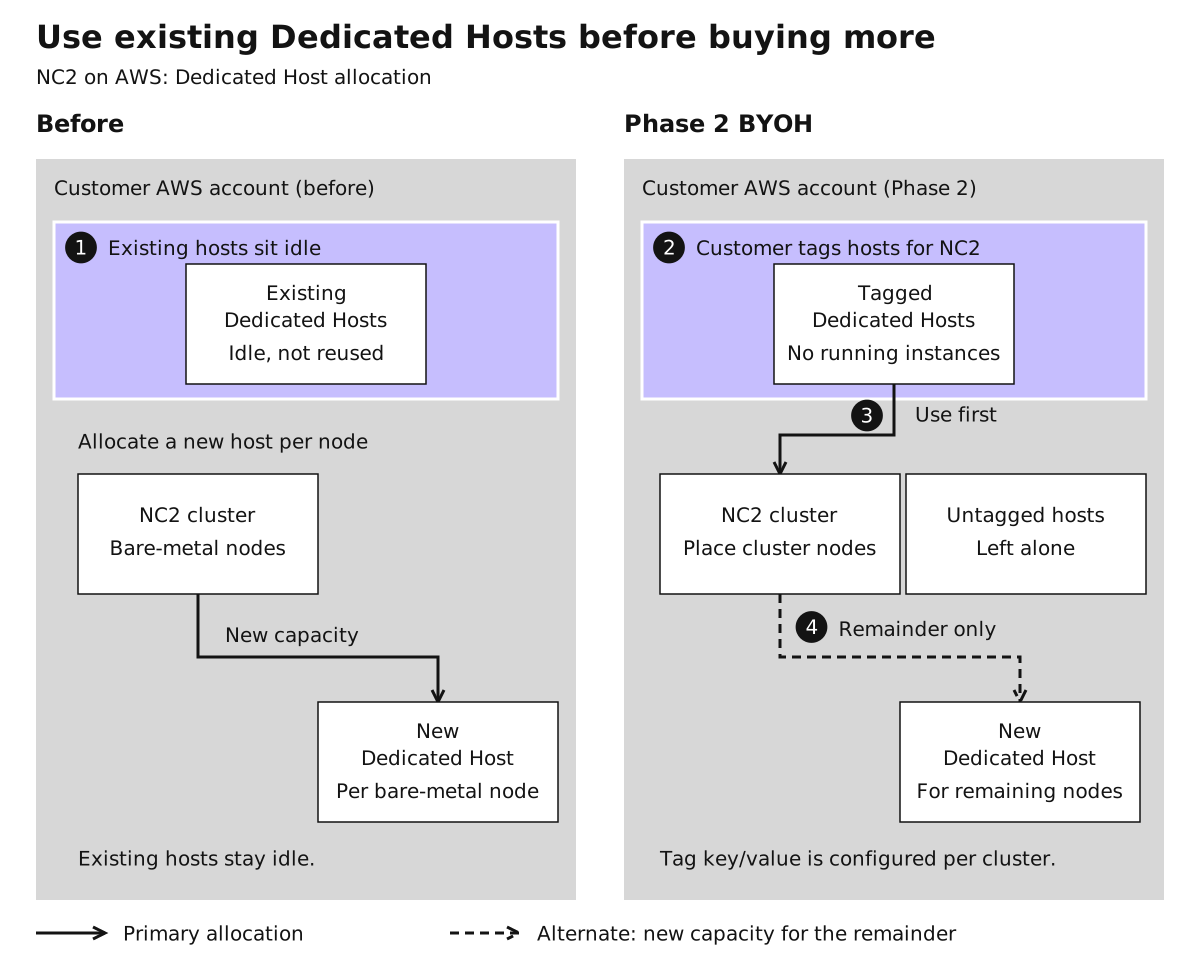
What happened next was simple and a bit wasteful. NC2 didn’t reuse Dedicated Hosts. Every bare-metal node got one newly allocated Dedicated Host. A three-node cluster meant three new hosts, regardless of how many idle hosts were already sitting in the account.
An earlier phase of BYOH started reusing suitable unused hosts that were already in the account. That solved the waste problem but opened a different one: NC2 could pick up a host the customer had set aside for something else. Phase 2 closes that gap.
What Phase 2 changes
The rule in Phase 2 is explicit consent through tagging.
You tag the Dedicated Hosts you want NC2 to use with an AWS tag key and value, and you set that tag restriction on the cluster. NC2 searches your AWS account for Dedicated Hosts that carry the matching tag. Hosts with the tag are candidates. Hosts without it are left alone, full stop. If you’ve got a pool of Dedicated Hosts reserved for a SQL Server estate and another pool earmarked for NC2, only the NC2 pool is in play.
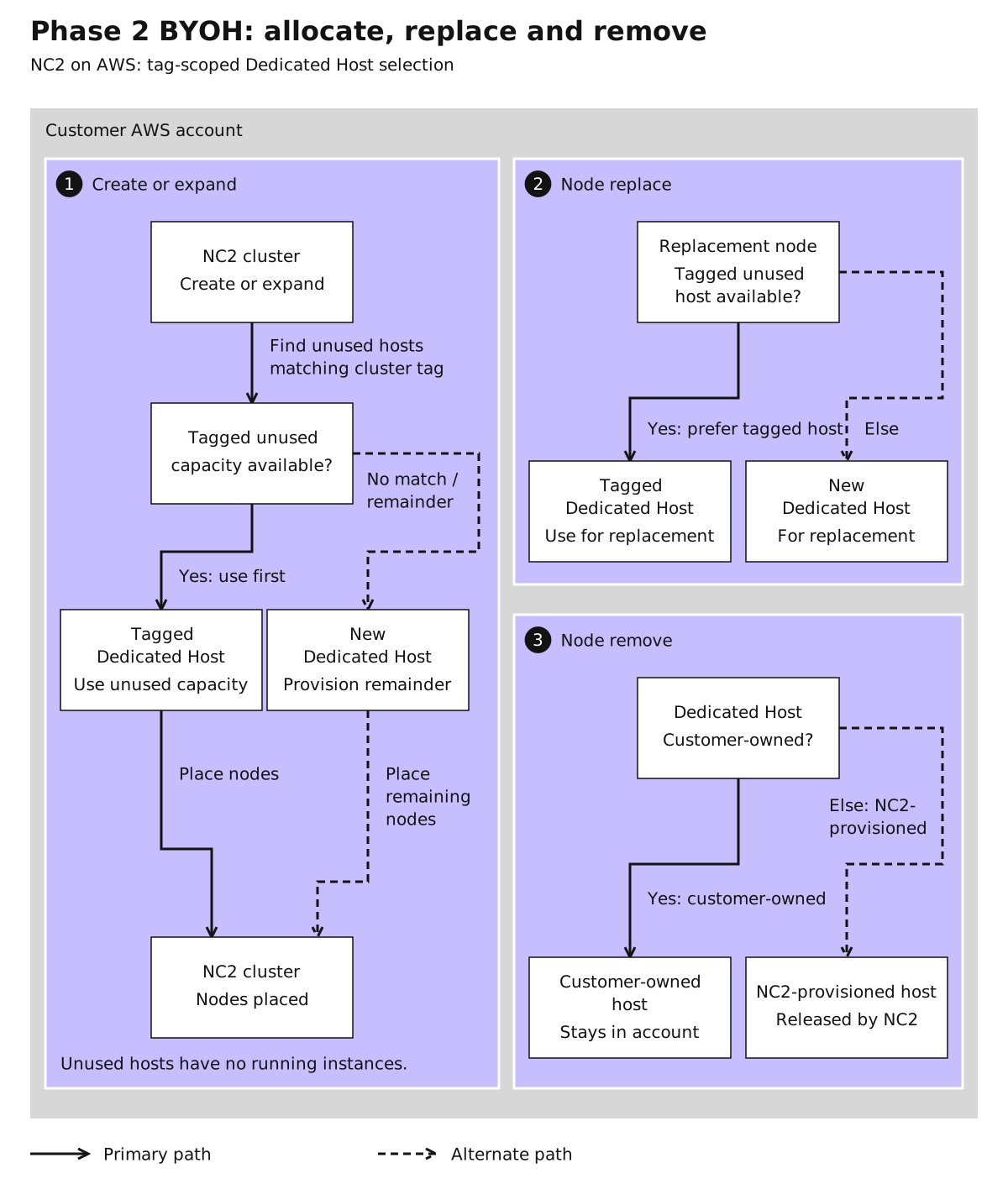
A tagged host also has to be unused. NC2 only consumes hosts with no running instances on them, so it never lands on top of something that’s already working. Tagging a busy host by mistake doesn’t put that workload at risk.
Create, expand, replace and remove
Create and expand. NC2 places nodes on your unused, tagged Dedicated Hosts first. When the tagged capacity runs out, NC2 automatically provisions net-new Dedicated Hosts to cover the rest.
Replace. When a node is condemned and replaced, NC2 prefers an unused tagged host you brought. If none is available, it provisions a new Dedicated Host for the replacement.
Remove. When you remove a node that was running on a host you bought, NC2 leaves that host in your account, untouched. It’s your host, and it goes back to being your capacity. Hosts that NC2 provisioned itself are released by NC2 when they’re no longer needed.
The tradeoffs of dedicated tenancy
BYOH makes Dedicated Hosts cheaper to use with NC2. It doesn’t change what Dedicated Hosts are, and the tenancy comes with real tradeoffs you should weigh before you commit a cluster to it.
No partition placement groups. With default tenancy, NC2 spreads bare-metal instances across partitions in an AWS placement group and maps each partition to a rack, so AOS can keep data replicas in separate fault domains. AWS doesn’t support partition placement groups on Dedicated Hosts. Nutanix can’t guarantee resiliency against an AWS rack partition failure on Dedicated Hosts, and you need your own rack-failure strategy to protect against data loss. Node failure resiliency still works with either tenancy. Rack failure resiliency is the part you own.
No Hibernate. AWS doesn’t support hibernation on Dedicated Hosts, so an NC2 cluster running on them can’t be hibernated. If your cost model for a DR or dev cluster depends on hibernating it, dedicated tenancy isn’t the right fit for that cluster.
No mixing, no switching. A cluster is either all default tenancy or all Dedicated Host. You choose at creation, and you can’t change it after the cluster is deployed.
Check your quota yourself. NC2 checks your quota for default tenancy instances. It doesn’t check Dedicated Host quota. Before you deploy, look at the AWS Service Quotas console and confirm you have enough Dedicated Host quota for the cluster, including whatever new hosts NC2 may need beyond the ones you’ve tagged.
Turn on the feature in the cloud account. Add the Dedicated Hosts feature to your cloud account in NC2. That’s what gives the CloudFormation stack the Dedicated Host permissions NC2 needs, such as ec2:AllocateHosts and ec2:DescribeHosts.
Check region and instance support. Not every region and bare-metal instance type combination supports dedicated tenancy. The supported regions and instance types table in the NC2 on AWS guide marks the ones that don’t.
Expect a different cost profile. Running on Dedicated Hosts can cost more than default tenancy. BYOH is about putting hosts you’ve already paid for to work, and the math is best when those hosts would otherwise sit idle.
Who should look at this
If your account has Dedicated Hosts with nothing running on them, and you’re planning an NC2 on AWS cluster, this is worth a conversation. Tag the hosts you want NC2 to use, set the tag on the cluster, plan your rack-failure strategy, and confirm your quota. The capacity you already bought finally gets to do some work.