The Foundation: NC2 and Why Bare Metal on AWS Changes the Equation
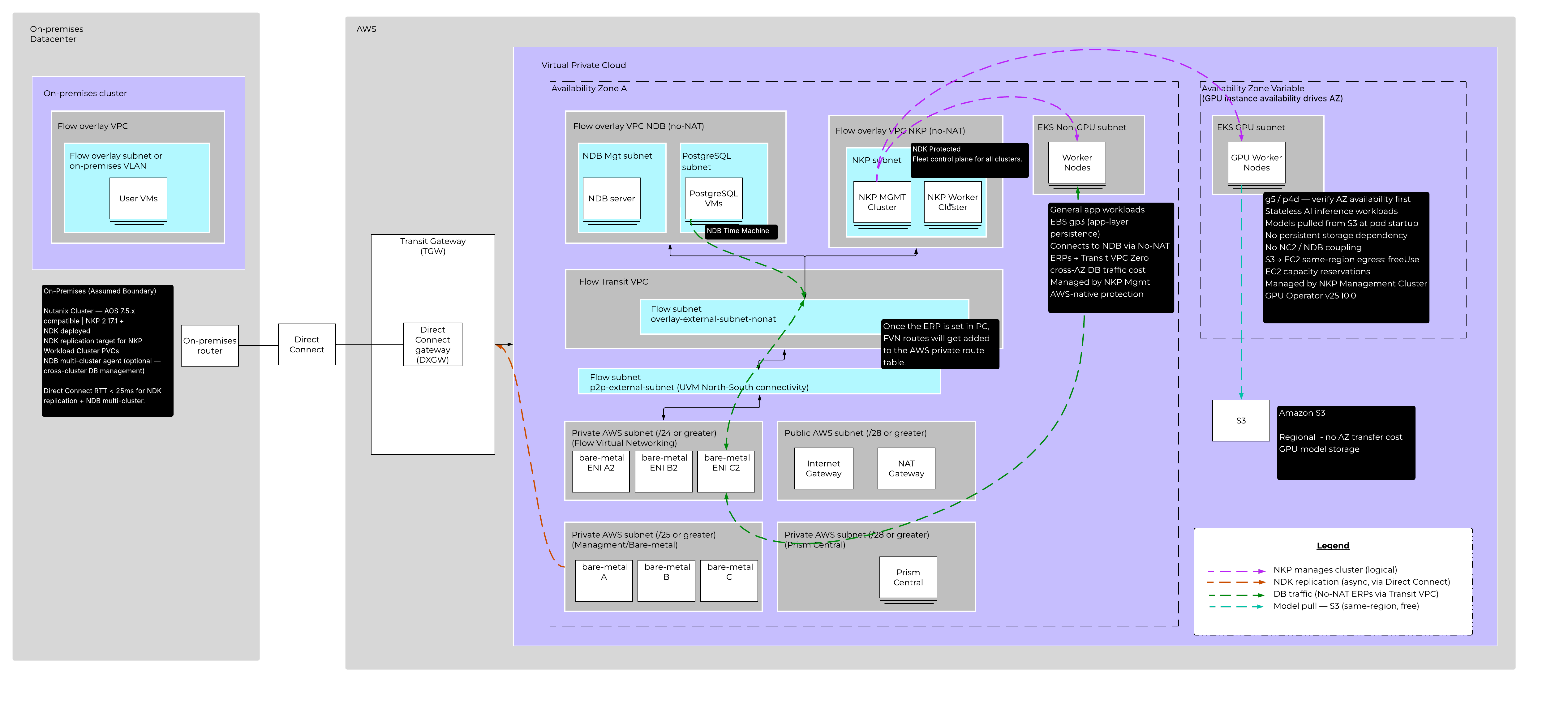
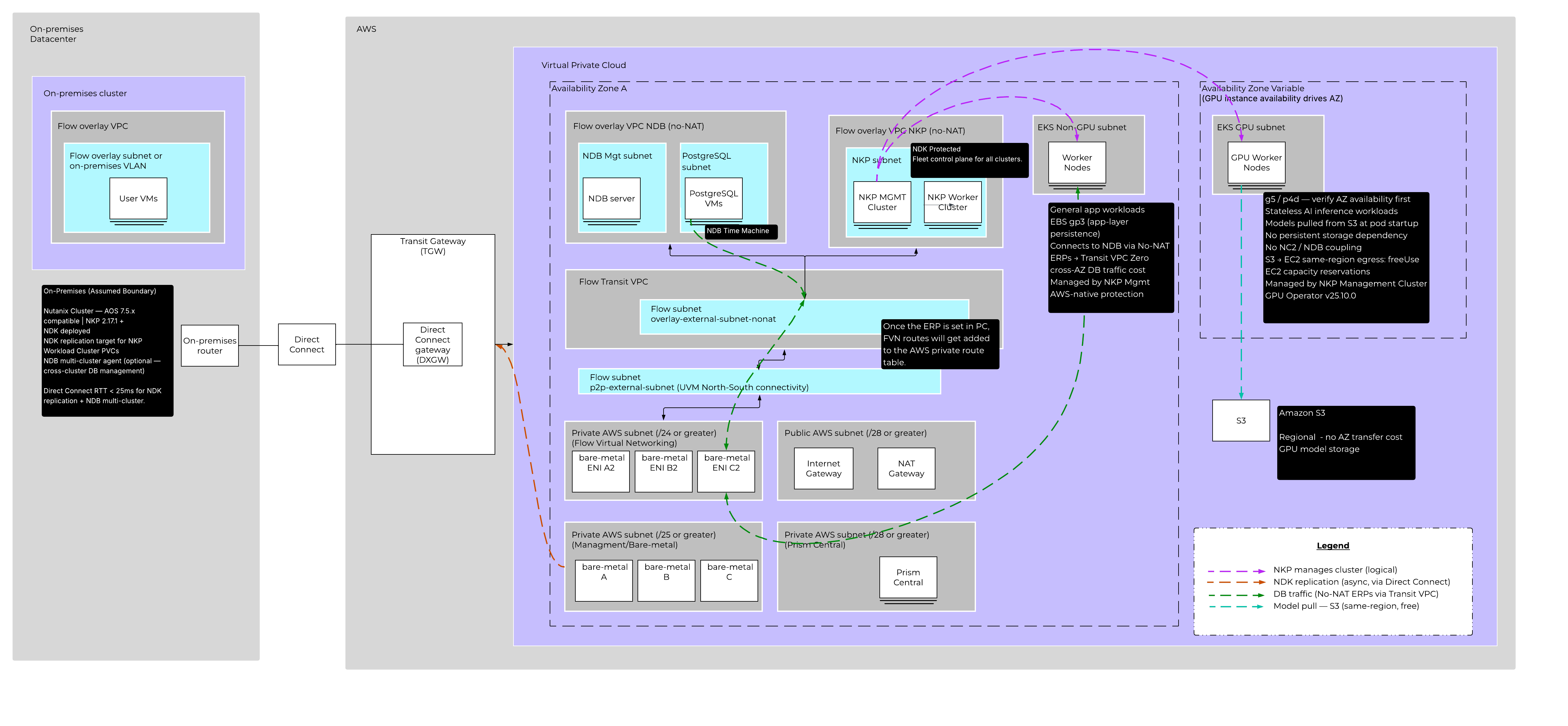
NC2 runs Nutanix AOS natively on AWS Dedicated Hosts. That means you get the full Nutanix HCI stack including AOS storage, the AHV hypervisor, and Flow Virtual Networking (FVN) as a software-defined overlay network, all running on bare metal capacity that you control.
One constraint worth knowing up front: NC2 on AWS is a single-Availability Zone deployment per cluster. That is not a limitation you work around. It is a constraint you design for. The AZ resilience story for this architecture sits at the EKS and data protection layers, not at NC2 itself.
For networking, FVN is the strategic overlay platform for NC2. All workloads running on NC2 participate in the FVN overlay. Prism Central (PC) is the FVN control plane, and in this architecture PC runs directly on NC2 rather than off-cluster. That is a deliberate choice: FVN availability must not depend on a Direct Connect connection to on-premises. If the WAN link drops, the overlay network on NC2 keeps running.
The FVN topology on NC2 follows a hub-and-spoke VPC model. There is one Transit VPC, which is the north-south routing hub handling Direct Connect uplinks and external BGP route advertisement. Off that hub sit two User VPCs: one for all NKP cluster VMs, and one dedicated to NDB. Separating NDB into its own VPC is worth doing at design time because it lets you apply Flow Network Security microsegmentation policies specific to database traffic independently from Kubernetes workload policies. Retrofitting that boundary later is painful.
The Kubernetes Fleet: NKP as the Single Control Plane
Nutanix Kubernetes Platform (NKP) 2.17.1 runs two clusters on NC2: a management cluster and a workload cluster, both as VMs on AHV within the NKP User VPC.
The management cluster is the control plane for the entire Kubernetes fleet. It manages not just the NC2 workload cluster but also two Amazon EKS clusters that are attached to NKP as managed clusters. This is important: you are not choosing between NC2 and EKS. You are using NKP to manage all of it from one place, with unified lifecycle management, policy enforcement, observability, and catalog services across every cluster regardless of where it runs.
The NKP workload cluster runs application workloads directly on NC2 bare metal. Its persistent volumes are backed by AOS natively because the cluster VMs run on AHV. That is also why CN-AOS is not needed here. CN-AOS exists for bare-metal Kubernetes deployments that do not have an AHV hypervisor underneath. When NKP runs as VMs on AHV on NC2, AOS is already the storage fabric. Adding CN-AOS would be redundant.
Two EKS Clusters, Two Different Design Philosophies
EKS GPU Cluster (Inference Workloads)
The GPU cluster is attached to NKP and runs stateless AI inference workloads. Models are loaded from Amazon S3 at pod startup. There is no persistent storage tied to NC2 or NDB.
Because the workload is stateless and S3 is regional, the GPU cluster’s worker nodes can float to whichever Availability Zone has the required GPU instance family available. g5 and p4d instance families can be capacity-constrained in specific AZs. Keeping the cluster AZ-flexible means you are not locked out of your instances because you pinned nodes to the wrong zone. Reserve capacity before you build.
EKS Non-GPU Cluster (Application Workloads)
The non-GPU cluster runs general application workloads that talk to NDB-managed databases. This cluster is pinned to AZ-1, the same AZ where NC2 and NDB run.
That AZ pinning is a cost decision. Database traffic between EKS application pods and NDB database VMs crosses the network continuously. Cross-AZ data transfer in AWS is not free. Pinning application worker nodes to AZ-1 eliminates that cost entirely for all database traffic.
Connecting EKS to NDB Across the FVN Overlay
EKS clusters are native AWS VPC resources. They are not part of the FVN overlay. Getting EKS application pods to reach NDB database VMs requires three things configured on the NDB User VPC: a No-NAT external subnet (so traffic arrives at NDB with the original source IP preserved, enabling symmetric routing), Externally Routable Prefixes (ERPs) that declare which overlay CIDRs are reachable from outside the VPC, and BGP route advertisement from the Transit VPC that propagates those ERP routes to the AWS routing table.
Once that is configured, EKS application pods connect to NDB-managed databases with standard connection strings. No application-layer changes.
NDB: Enterprise Database Lifecycle on NC2
NDB 2.10 runs on NC2 as VM-based infrastructure. It is not containerized and does not run inside Kubernetes. The NDB server VM and all database server VMs run on AHV in the NDB User VPC, using AOS storage.
What NDB provides on top of raw database VMs is significant: one-click provisioning of database environments from software profiles, Copy Data Management via Time Machine (zero-byte clones, point-in-time recovery, snapshot-based restore), one-click patching for OS and database software, and multi-cluster management across NC2 and on-premises Nutanix clusters.
For PostgreSQL high availability, NDB provisions a cluster of 3 to 5 database server VMs, each running PostgreSQL with Patroni and etcd. Patroni handles primary election and streaming replication. etcd provides distributed consensus. HAProxy (up to two nodes) routes client traffic to the primary for read/write operations or to a replica for read-only, based on port selection. Keepalived manages a floating virtual IP across the HAProxy nodes, and that VIP is what application connection strings target.
One thing to know about NDB-provisioned VMs: they cannot be added to AOS protection domains. NDB does not support Nutanix NearSync, Metro Availability, or DRaaS for NDB-provisioned VMs. NDB Time Machine is the protection mechanism, and it handles database-consistent PITR independently of AOS snapshotting. Do not try to layer both.
NDK: Kubernetes-Native Protection Back to On-Premises
Nutanix Data Services for Kubernetes (NDK) runs as a Kubernetes operator inside the NKP workload cluster. It takes application-consistent snapshots of PVCs backed by AOS volumes and replicates those snapshots to an on-premises Nutanix cluster over AWS Direct Connect.
NDK replication operates at the AOS CVM-to-CVM level using native AWS VPC IPs, not the FVN overlay. Direct Connect reaches the NC2 CVMs directly. RTT between NC2 and the on-premises cluster must be under 25ms for reliable replication and for NDB multi-cluster operation.
Each protection layer in this architecture owns its domain cleanly. NDK owns NKP workload cluster PVC protection. NDB Time Machine owns database protection. The EKS GPU cluster is stateless so S3 handles recovery. The EKS non-GPU cluster uses EBS snapshots for application-layer state. There is no overlap and no gap.
An Alternative for Cloud-Native Deployments
For teams without an existing on-premises Nutanix footprint, a second NC2 cluster in AZ-2 can serve as the NDK replication target instead. NDK replicates from AZ-1 to AZ-2 within AWS. The second cluster operates at minimum viable scale under normal conditions and scales out only during a declared recovery event. This removes the Direct Connect dependency and fits a cloud-native operational model. The trade-off is additional Dedicated Host cost for the standby cluster versus the Direct Connect and on-premises infrastructure costs of the hybrid approach.
What This Platform Actually Gives You
Four products, each doing what it is built for, coordinated into a single operational surface.
NC2 gives you Nutanix bare metal capacity on AWS with enterprise storage and networking. NKP gives you a single control plane across NC2 and EKS without forcing you to choose one or the other. NDB gives you enterprise database lifecycle management without asking your DBAs to learn Kubernetes operators. NDK gives your Kubernetes workloads a cross-site protection story that works natively with AOS-backed storage.
The decisions that matter most in this architecture are the ones that are easy to get wrong: AZ pinning for the non-GPU cluster, two separate User VPCs for microsegmentation, PC running locally for FVN independence, and understanding that NDB protection and AOS protection are parallel tracks that do not intersect. Get those right at design time and the rest follows.
The deeper value here is consistency. NKP is not AWS-only. The same management cluster that governs your NC2 workload cluster and your EKS clusters today can also manage on-premises Nutanix clusters and AKS clusters in Azure. Your operations team learns one set of tools, one policy model, one observability stack — regardless of where workloads actually run. That is where the real operational stress reduction comes from. Not from picking the right cloud, but from not having to context-switch between five different control planes every time something needs attention.
Nutanix NC2 Technical Marketing | A-Team